
A software project milestone is a zero-duration checkpoint that marks a significant achievement, decision, or phase transition in a project. Unlike tasks, milestones consume no time or resources. They simply declare that something meaningful has been completed and the team is ready to move forward. Understanding how software project milestones work is the difference between a project that drifts and one that delivers. Milestones create accountability, surface risk early, and give stakeholders a clear, binary view of progress: achieved or not achieved.
How software project milestones work: definitions and core mechanics
Project milestones are zero-duration events that mark major progress points like phase completions, approvals, and launches. They are distinct from tasks, which consume time, and deliverables, which are tangible outputs. A milestone says "this phase is done and verified." It does not say "we are 80% there."
The most common examples in software development include design approval by stakeholders, completion of a working prototype, sign-off on a testing phase with zero critical defects, and a production release. Each of these represents a clear state change in the project. The team was in one phase; now they are in the next.

Milestones serve four core functions in software project management. They create accountability by assigning ownership to a named individual. They provide visibility by giving stakeholders a clear status without requiring them to parse task lists. They enforce alignment by requiring teams to agree on what "done" actually means before work begins. They also act as risk triggers, because a missed milestone signals a problem that needs attention now, not at the end of the project.
The term used in formal project management frameworks like PMI's PMBOK is "milestone." Agile frameworks like Scrum use the concept under different labels, such as sprint reviews or release gates, but the underlying mechanic is identical: a verifiable checkpoint that confirms readiness to proceed.
What are the best practices for defining project milestones?
Defining milestones well is harder than it looks. Most teams default to vague labels like "design phase" or "testing complete," which create the illusion of structure without the substance. Effective milestone planning requires precision at the definition stage.
The SMART framework applies directly here. A milestone should be Specific, Measurable, Attainable, Relevant, and Timely. "Testing complete with zero critical defects and sign-off from QA lead by March 14" is a SMART milestone. "Testing done" is not. The difference matters because clear acceptance criteria reduce ambiguity and make milestone status indisputable.
Four practices separate high-performing teams from the rest when it comes to defining milestones:
- Assign a single owner. Ownership belongs to one person accountable for the milestone outcome, not the entire team executing the work. Shared ownership is no ownership.
- Write the acceptance criteria first. Before setting a date, define exactly what must be true for the milestone to be achieved. This forces clarity and often reveals hidden complexity.
- Limit milestone frequency. Best practice suggests milestones every 4-6 weeks in long projects. Too many milestones dilute their significance and create administrative overhead without adding visibility.
- Map dependencies explicitly. Sequence milestones based on critical path analysis. If the API integration milestone must precede the front-end completion milestone, that dependency needs to be visible in your plan.
Pro Tip: Write your milestone acceptance criteria as a checklist, not a sentence. "API endpoints documented, unit tests passing at 95% coverage, and security review signed off" is harder to game than "API development complete."
Technology projects at companies like Atlassian and Inventify both demonstrate that clear dependencies and ownership in milestone planning are the primary factors separating projects that finish on time from those that slip indefinitely.
How do milestones improve tracking and risk management?
Milestones are the most effective risk management tool available to a project manager, and most teams underuse them. The reason is simple: milestones force precise definitions of "done", which turns vague timelines into actionable business data. When a milestone is missed, the project has a problem. When a task slips, it might just be normal variance.
Here is how to use milestones systematically for tracking and risk management:
- Track milestone velocity. The rate at which your team achieves milestones is a leading indicator of project health. If you planned four milestones in the first quarter and achieved two, your delivery forecast needs to be revised now, not at the end of the quarter.
- Run structured milestone reviews. Schedule a review at each milestone, not just at the end of the project. These reviews should answer three questions: Was the milestone achieved? If not, why? What does this mean for downstream milestones?
- Automate status notifications. Tools like Jira and monday.com allow milestone status to trigger automatic notifications to stakeholders. This removes the manual reporting burden and keeps everyone informed in real time.
- Link milestones to OKRs. When a milestone is tied to a measurable business objective, missing it carries organizational weight. This connection motivates teams and gives executives a direct line of sight from project progress to strategic outcomes.
Milestones also serve as accountability forcing functions. Without assigned review dates and clear decision points, projects drift indefinitely even when the team knows something is wrong. A missed milestone creates a mandatory conversation. That conversation is where risk gets managed.
What are the most common pitfalls in milestone planning?
Even experienced project managers fall into predictable traps when setting milestones. Recognizing these patterns is the first step to avoiding them.
The most damaging pitfall is using milestones to track incremental progress. Milestones must be binary: either achieved or not. "Design 80% complete" is not a milestone. It is a task status update dressed up as a checkpoint. This distinction matters because a binary milestone forces a decision, while a percentage creates a false sense of progress that can mask serious problems.
Other common pitfalls include:
- Setting dates before defining criteria. Teams often pick a milestone date based on stakeholder pressure, then work backward to justify it. The correct sequence is to define what must be true, estimate the work required, and then set the date.
- Losing stakeholder alignment between reviews. Milestones only maintain alignment if stakeholders are engaged at each checkpoint. A milestone review skipped is an alignment gap created.
- Confusing milestones with deliverables. A deliverable is a tangible output, like a design document or a deployed feature. A milestone is the verification that the deliverable meets its acceptance criteria. Both are necessary; they are not the same thing.
- Milestone overload. Adding a milestone for every minor task completion turns your project plan into a task list with extra steps. Focus milestones on phase transitions, external dependencies, and points where the project could legitimately stop or change direction.
Pro Tip: Work backward from your final delivery date using historical data from similar projects. Backwards scheduling reveals whether your desired timeline is feasible given actual complexity and resource constraints, before you commit to it publicly.
How do milestone charts and tools support project visibility?
A milestone chart is a visual representation of your project's critical checkpoints, stripped of task-level detail. Milestone charts distill complex timelines into clear dashboards focused on what matters most: are we on track to hit the next major checkpoint?
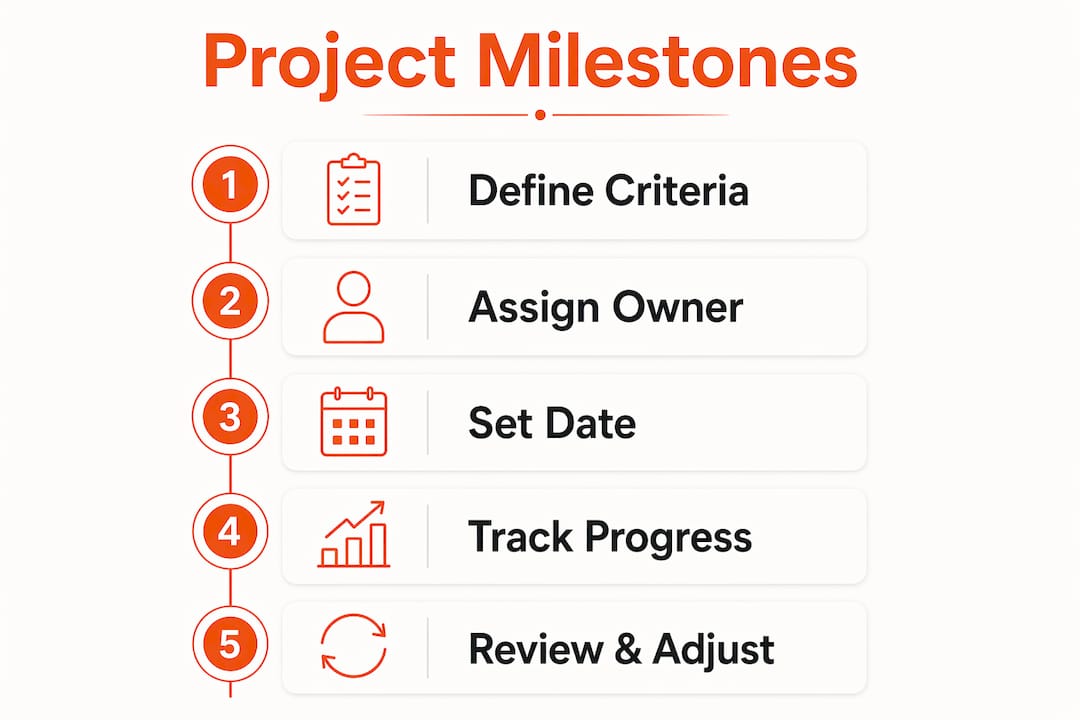
The primary value of a milestone chart is communication. Executives do not need to see 200 tasks. They need to know whether the product launch milestone is on track, who owns it, and what the dependencies are. A well-constructed milestone chart answers all three questions in under 30 seconds.
| Tool | Milestone tracking capability |
|---|---|
| Jira | Native milestone markers linked to sprints and epics; supports dependency mapping |
| monday.com | Visual milestone timeline with automated status updates and stakeholder notifications |
| Microsoft Project | Gantt-based milestone tracking with critical path visualization |
| Asana | Milestone feature within project timelines; integrates with portfolio-level dashboards |
Modern tools go beyond static charts. Jira and monday.com both link milestones directly to workflows, so when the underlying tasks are completed and verified, the milestone status updates automatically. This removes the manual tracking burden and gives project managers real-time visibility without requiring constant status meetings.
Pro Tip: Use your milestone chart as the default view for executive stakeholder updates. Reserve the full project plan for internal team reviews. Matching the level of detail to the audience prevents information overload and keeps stakeholders focused on decisions, not data.
How do Agile and Waterfall teams use milestones differently?
The mechanics of milestones are universal, but how they are applied varies significantly between Agile and traditional Waterfall environments.
In Waterfall, milestones mark formal phase gates. The completion of requirements documentation, design approval, development sign-off, and testing completion are all milestone events. Each gate requires formal approval before the next phase begins. This structure works well when requirements are stable and the project scope is well-defined upfront.
Agile teams use milestones differently. Rather than fixed phase gates, Agile adapts milestones as iterative value checks. Sprint reviews, MVP releases, and feature flag activations all function as milestones. The focus shifts from phase completion to value delivery and assumption validation.
| Dimension | Waterfall milestones | Agile milestones |
|---|---|---|
| Frequency | Fixed, phase-based | Iterative, sprint or release-based |
| Flexibility | Low; changes require formal re-planning | High; milestones adjust with backlog priorities |
| Approval process | Formal sign-off required | Team and product owner verification |
| Risk management | Front-loaded risk identification | Continuous risk validation through delivery |
Both approaches share two non-negotiable requirements: clear acceptance criteria and named ownership. A sprint review milestone without defined acceptance criteria is just a meeting. An MVP release without a named owner is a shared responsibility, which means it belongs to no one.
The practical recommendation for most software teams in 2026 is a hybrid approach. Use Waterfall-style phase gate milestones for regulatory, contractual, or external dependency checkpoints. Use Agile-style iterative milestones for internal delivery cycles. This combination gives you the governance structure stakeholders need and the flexibility development teams require.
Key takeaways
Effective software project milestone management requires binary definitions, named ownership, and regular review cycles to convert planning into predictable delivery.
| Point | Details |
|---|---|
| Milestones are binary checkpoints | A milestone is either achieved or not; percentage-based progress indicators are task statuses, not milestones. |
| Define criteria before setting dates | Write acceptance criteria first, then estimate work, then set the milestone date to avoid infeasible commitments. |
| Assign single ownership | One named person must be accountable for each milestone outcome, regardless of how many people contribute. |
| Use milestone velocity as a health signal | Track your rate of milestone achievement as a leading indicator and adjust forecasts before problems compound. |
| Adapt milestone style to methodology | Waterfall teams use phase gates; Agile teams use iterative value checks. Both require clear criteria and ownership. |
Why milestones are the most underrated tool in your project management kit
I have worked on software projects where the team had hundreds of tasks tracked in Jira, daily standups, and detailed sprint plans, and still shipped six weeks late. The problem was never the tasks. It was the absence of meaningful milestones. Nobody had defined what "ready to test" actually meant. Nobody owned the decision to move from development to QA. The project drifted because there was no forcing function to surface the misalignment.
The insight that changed how I approach project planning came from a simple reframe: milestones are not dates on a calendar. They are answers to the question "what must be true before we can proceed?" When you start with that question, the acceptance criteria write themselves, the ownership becomes obvious, and the date becomes a consequence of the plan rather than an arbitrary constraint imposed on it.
The teams I have seen execute milestones well share one habit: they run a structured review at every milestone, even when the milestone is achieved on time. The review is not a celebration. It is a 30-minute conversation about what the achievement reveals about the next phase. That discipline, more than any tool or framework, is what separates projects that deliver from projects that drift.
Milestone charts and tools like Jira and monday.com amplify this discipline by removing the manual tracking burden. But the tool is only as good as the milestone definition behind it. Automate a vague milestone and you get automated noise. Automate a precise, binary milestone with clear ownership and you get a real-time project health signal that actually means something.
— Kaleb
Build your next project on a milestone-driven foundation with Maestroforge
Maestroforge builds custom web and mobile applications for Northwest Arkansas businesses using a transparent, milestone-driven delivery process. Every project starts with a defined set of checkpoints, from kickoff through launch, so you always know exactly where your project stands. Ozark Freight Partners reduced operational calls by 40% after Maestroforge delivered a custom carrier portal on a structured, milestone-tracked timeline. If you want a development partner who treats milestones as accountability tools rather than calendar decorations, start the conversation with Maestroforge today.
FAQ
What is a software project milestone?
A software project milestone is a zero-duration checkpoint marking a significant achievement, phase transition, or approval in a project. It has a binary status: either achieved or not achieved.
How do you set project milestones effectively?
Define acceptance criteria before setting a date, assign a single named owner, and limit milestones to significant checkpoints every four to six weeks. Avoid using milestones for incremental progress like "design 80% complete."
How are milestones different from tasks and deliverables?
Tasks consume time and resources to produce work. Deliverables are the tangible outputs of that work. Milestones verify that a deliverable meets its acceptance criteria and the project is ready to move to the next phase.
How do Agile teams use milestones?
Agile teams use iterative milestones such as sprint reviews, MVP releases, and feature validations rather than fixed phase gates. Both Agile and Waterfall milestones require clear acceptance criteria and named ownership to be effective.
What tools support milestone tracking in software projects?
Jira and monday.com both offer native milestone tracking linked to workflows, with automated status updates and stakeholder notifications. Microsoft Project and Asana also support milestone visualization within Gantt and timeline views.