
Most projects don't fail because of bad code. They fail because nobody agreed on what "support" actually means. Setting support expectations with developers is one of those foundational steps that gets skipped in the rush to launch, then becomes the source of every frustrating back-and-forth when something breaks. This guide gives you a practical framework covering the key terms you need to define, the preparation steps that prevent confusion, and the communication habits that keep your development team and your stakeholders aligned from day one.
Table of Contents
- Key takeaways
- Setting support expectations with developers: the core terms you need
- Preparation before you write a single SLA line
- How to write and communicate your SLA terms
- Managing the process once expectations are set
- Common pitfalls and how to avoid them
- What I have learned from managing developer support frameworks
- Work with a team that builds support in from the start
- FAQ
Key takeaways
| Point | Details |
|---|---|
| Define SLA terms upfront | Specify response time, resolution time, and severity levels before work begins to eliminate ambiguity. |
| Build an escalation matrix | Map severity levels to owners and time thresholds so your team acts fast when incidents happen. |
| Automate priority assignment | Use tools to assign ticket priority consistently and reduce human error in triage. |
| Communicate with facts, not assumptions | Separate what you know from what you suspect when reporting issues to your development team. |
| Treat SLAs as living documents | Review and adjust support agreements regularly based on real performance data and team capacity. |
Setting support expectations with developers: the core terms you need
Before you can set expectations, you need a shared vocabulary. The industry term for a formalized support agreement is a Service Level Agreement, or SLA. SLAs translate vague promises into measurable commitments with real consequences for misses, including service credits or contract termination rights. Without one, "we'll fix it soon" means something different to every person in the room.
Two terms inside every SLA trip people up: response time and resolution time. Response time is how long it takes your team to acknowledge an issue. Resolution time is how long it takes to fix it. These are not the same thing, and conflating them leads to developers claiming they met their commitment when they replied to a ticket, even though the problem sat unresolved for three more days.
Priority levels: the backbone of any support framework
Priority levels give your SLA its teeth. A well-structured model typically uses four tiers.
- Critical: System is completely down or data is at risk. No workaround exists. Zero-minute first response targets apply here.
- High: A major feature is broken and affecting multiple users. Work is severely impaired.
- Medium: A non-critical function is degraded. A workaround exists but is inconvenient.
- Low: Minor issues, cosmetic bugs, or feature requests with no immediate business impact.
Clear definitions here do more than organize your inbox. They prevent priority inflation, which is what happens when every user calls their issue "critical" and your developers spend the day firefighting minor bugs while a real outage goes unaddressed.
The SLA measurement detail most people miss
One nuance that catches teams off guard: SLA timers and ticket states must be defined together. If your ticket system pauses the SLA clock when a ticket moves to "Pending" or "On Hold," but your client thinks the clock is still running, you will have a trust problem before you have a resolution. Agree on these mechanics in writing before you go live.
Preparation before you write a single SLA line
Getting your house in order before drafting any formal agreement saves you from building rules on a shaky foundation. This phase is about clarity of ownership, not paperwork.

Start by identifying who on your development team actually handles support. Not the team in general. A named person or rotation. Dedicated support contacts with assigned responsibilities reduce confusion and prevent tickets from sitting in a shared inbox while everyone assumes someone else picked it up.
Next, set up your communication channels. A dedicated support email or ticketing tool keeps issues out of Slack threads and text messages, where they get buried. Your clients need one clear path to report a problem, and your developers need one clear place to find it.
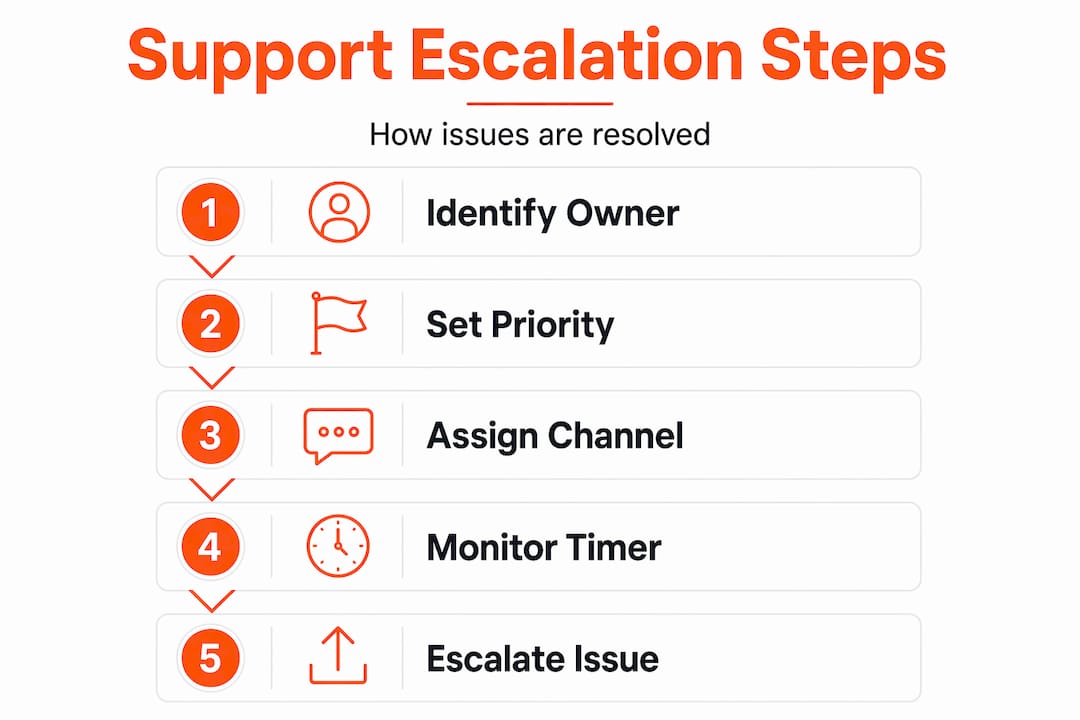
Building your escalation matrix
An escalation matrix is a simple document that answers one question: when this severity of problem goes unsolved for this long, who gets notified next? Here is what it should include.
- Severity level (Critical, High, Medium, Low)
- Initial owner (the developer or team lead responsible at first contact)
- Time threshold before escalation (e.g., 30 minutes for Critical, 4 hours for High)
- Next escalation contact (senior developer, project manager, or business owner)
- Final escalation contact (executive or client stakeholder)
The matrix is only useful if people know how to use it under pressure. Escalation policies without practice stay theoretical. Run a simulated incident once a quarter. Walk your team through a mock Critical outage and have them execute the escalation steps in real time. The judgment gaps you find in a drill are far less costly than the ones you find during an actual crisis.
Pro Tip: Keep your escalation matrix as a pinned document in your project management tool, not buried in a shared drive. If someone has to search for it during an incident, it will not get used.
How to write and communicate your SLA terms
Now you are ready to put numbers on paper. Effective developer support guidelines are specific, achievable, and visible to everyone involved.
Here is a practical sequence for drafting your SLA terms.
- Define your support hours. Are you offering 9-to-5 coverage on business days, or 24/7 response for critical issues? Be explicit. "Business hours" means different things in different time zones.
- Set your response time targets by severity. Use the priority tiers you defined earlier. A reasonable starting point for a small development team: Critical gets a 15-minute response, High gets 1 hour, Medium gets 4 hours, and Low gets 1 business day.
- Set your resolution time targets. These will be longer. Critical might be 4 hours to resolution, High might be 1 business day, and Medium might be 3 business days. Adjust based on your team's actual capacity.
- Define your update cadence. How often will you communicate status during an open issue? Every 30 minutes for Critical? Once a day for Medium? Write it down.
- Specify consequences for misses. Transparent SLA commitments build more trust than vague promises. If you miss a target, what happens? A service credit, a priority bump, or a formal review?
| Severity | First response | Resolution target | Update cadence |
|---|---|---|---|
| Critical | 15 minutes | 4 hours | Every 30 minutes |
| High | 1 hour | 1 business day | Every 2 hours |
| Medium | 4 hours | 3 business days | Once daily |
| Low | 1 business day | 1 week | On resolution |
One operational upgrade that pays off quickly: automate priority assignment using keywords, customer tier, or sentiment signals in your ticketing tool. Manual triage is slow and inconsistent. When the system assigns priority automatically, your SLA clock starts on time every time.
Pro Tip: Set your internal SLA targets 10 to 15 percent tighter than what you publish to clients. That buffer gives your team room to handle unexpected complexity without missing a client-facing commitment.
Managing the process once expectations are set
Writing an SLA is the easy part. Keeping your team accountable to it is where most businesses struggle.
Start with visibility. Your ticketing tool should surface SLA compliance at three levels: individual developer, team, and client. If you cannot see at a glance which tickets are approaching their deadline, you are managing reactively instead of proactively.
Schedule a weekly SLA review. Look at your breach rate, your average response and resolution times, and any patterns in the types of issues that keep escalating. This is also where you catch internal misalignment on ticket states before it becomes a client complaint.
When issues do escalate, keep communication factual and minimal. Providing minimum reproducible context when reporting a problem, including official product names, exact URLs, and a clear separation of what you know from what you suspect, cuts triage time significantly. Engineers spend less time asking clarifying questions and more time solving the actual problem.
Revisit your SLA terms every quarter. If your team is consistently breaching Medium-tier targets, either your targets are unrealistic or you have a staffing gap. Either way, the data tells you what to fix. Engineers need acceptance criteria written in plain language to work without ambiguity, and your SLA review is the right moment to tighten that language based on real experience.
Common pitfalls and how to avoid them
Even well-intentioned support frameworks break down in predictable ways. Here are the most common failure points and how to get ahead of them.
- Vague SLA language. "We will respond quickly" is not an SLA. If your agreement has no numbers, it has no accountability. Every metric needs a unit of time attached to it.
- Priority inflation without guardrails. When clients can self-assign priority, every ticket becomes Critical within a week. Use automated rules or a defined intake form to control priority assignment at the source.
- Overpromising availability. A two-person development team cannot offer 24/7 Critical response without burning out. Set coverage hours your team can actually sustain, then communicate them clearly upfront.
- Skipping escalation practice. Policies that only exist on paper create hesitation during real incidents. Simulated escalation drills close the gap between knowing the process and executing it under pressure.
- Treating the SLA as a one-time document. Business needs change, team capacity changes, and your support volume will grow. An SLA that was right at launch may be wrong six months later.
"Clarity beats micromanagement. Define specificity, timeline, context, constraints, and measurable success to avoid the extremes of no guidance or overcontrol." The STICCS framework
What I have learned from managing developer support frameworks
I have seen both extremes. Projects where the SLA was a three-page document nobody read, and projects where there was no SLA at all and every incident turned into a negotiation. Neither works.
What actually works is specificity paired with flexibility. You need numbers, owners, and time thresholds. But you also need a shared understanding that the document will evolve. The teams I have seen handle incidents best are the ones who practiced their escalation process before they needed it. When a Critical issue hits at 9 PM, there is no time to read a policy. The decision has to be muscle memory.
The other thing I have learned: ambiguous SLAs do not just cause delays. They damage trust in a way that is hard to repair. When a client does not know what to expect and something goes wrong, they assume the worst. When they know exactly what to expect and you meet it, even a difficult incident becomes manageable.
My advice is to treat your support agreement as a living conversation, not a contract you sign and file. Review it with your development team regularly. Ask what is working, what is creating friction, and what the data is telling you. The teams that do this consistently are the ones that build the kind of collaboration that actually lasts.
— Kaleb
Work with a team that builds support in from the start
At Maestroforge, we build custom web and mobile applications for Northwest Arkansas businesses, and we treat support expectations as part of the project design, not an afterthought. From the first conversation, we define response commitments, escalation contacts, and communication protocols so you always know what to expect and who to call. Our clients, like Ozark Freight Partners, have seen real operational results because the collaboration structure was clear from day one. If you are ready to work with a development team that takes accountability seriously, we would love to talk.
FAQ
What is an SLA in software development support?
An SLA, or Service Level Agreement, is a formal document that defines measurable support commitments including response times, resolution targets, and priority levels. It creates accountability and gives both parties a clear standard to measure performance against.
How do you define priority levels for developer support?
Priority levels are typically defined by business impact. Critical means the system is down with no workaround, High means major functionality is impaired, Medium means a workaround exists, and Low covers minor or cosmetic issues with no immediate business impact.
How often should you review your support SLA with developers?
Review your SLA at least quarterly. Use actual performance data, breach rates, and team capacity to adjust targets so your agreement stays realistic and effective as your project evolves.
What should you include in a developer escalation matrix?
An escalation matrix should list each severity level, the initial owner, the time threshold before escalation, and the next contact in the chain. Pair it with regular practice drills so your team can execute it under pressure without hesitation.
How does automating priority assignment improve developer support?
Automated priority assignment uses keywords, customer tier, or sentiment signals to categorize tickets consistently, which starts the SLA clock immediately and removes the delays and inconsistencies that come with manual triage.